
티스토리 뷰
참조 : https://tttsss77.tistory.com/155
도커(Docker) : 포트 포워딩 설정(포트 맵핑)하기
도커(Docker) : 포트 포워딩 설정(포트 맵핑)하기 본 글에서는 도커 컨테이너 내부에서 동작하는 서버로 컨테이너 외부에서 접속할 수 있도록 포트 포워딩(Port forwarding) 설정 또는 포트 맵핑(Port mapp
tttsss77.tistory.com
간단히 nginx image를 실행 시키기 위해 docker를 run할 때 port를 설정 했으나,
문제가 있어서, 이 부분을 확실히 익히고자 내용을 정리한다.
문제점
| 상대편이 연결을 끊음 / 상대편이 연결을 끊음 |
| kina@docker-ubuntu:~$ docker run -d -p 80:8080 --name webserver nginx:1.14 52e4cae30a48fc911def32f9ad38ceb45f4f4782c05af1b80e8e9c8b13053e5f kina@docker-ubuntu:~$ curl http://localhost:80 curl: (56) Recv failure: 상대편이 연결을 끊음 kina@docker-ubuntu:~$ curl http://localhost:8080 curl: (7) Failed to connect to localhost port 8080: 연결이 거부됨 |
Publish or expose port (-p, --expose)🔗
$ docker run -p 127.0.0.1:80:8080/tcp ubuntu bash
This binds port 8080 of the container to TCP port 80 on 127.0.0.1 of the host machine. You can also specify udp and sctp ports. The Docker User Guide explains in detail how to manipulate ports in Docker.

kina@docker-ubuntu:~$ docker run -d -p 80:8080 --name webserver nginx:1.14
52e4cae30a48fc911def32f9ad38ceb45f4f4782c05af1b80e8e9c8b13053e5f
kina@docker-ubuntu:~$ curl http://localhost:80
curl: (56) Recv failure: 상대편이 연결을 끊음
kina@docker-ubuntu:~$ curl http://localhost:8080
curl: (7) Failed to connect to localhost port 8080: 연결이 거부됨
kina@docker-ubuntu:~$ docker logs webserver
kina@docker-ubuntu:~$ docker container rm -f webserver
webserver

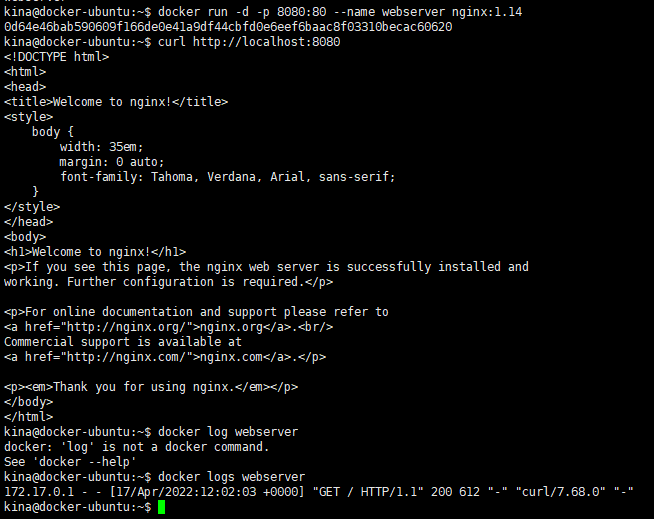
kina@docker-ubuntu:~$ docker run -d -p 8080:80 --name webserver nginx:1.14
0d64e46bab590609f166de0e41a9df44cbfd0e6eef6baac8f03310becac60620
kina@docker-ubuntu:~$ curl http://localhost:8080
<!DOCTYPE html>
<html>
<head>
<title>Welcome to nginx!</title>
<style>
body {
width: 35em;
margin: 0 auto;
font-family: Tahoma, Verdana, Arial, sans-serif;
}
</style>
</head>
<body>
<h1>Welcome to nginx!</h1>
<p>If you see this page, the nginx web server is successfully installed and
working. Further configuration is required.</p>
<p>For online documentation and support please refer to
<a href="http://nginx.org/">nginx.org</a>.<br/>
Commercial support is available at
<a href="http://nginx.com/">nginx.com</a>.</p>
<p><em>Thank you for using nginx.</em></p>
</body>
</html>
kina@docker-ubuntu:~$
'MSA! 누구냐 넌?! > 먼저, Docker' 카테고리의 다른 글
| Docker 유용한 팁 (0) | 2022.04.17 |
|---|---|
| Docker Container를 Image로 만들기 - commit 명령어 (0) | 2022.04.13 |
| Docker Container 만들고 실행 실습 - $docker push (0) | 2022.04.13 |
| Docker Container 만들고 실행 실습 (1) | 2022.04.12 |
| Docker Container 실행 실습 (0) | 2021.12.16 |
- Total
- Today
- Yesterday
- docker commit
- docker #hypervisior #virtualbox
- docker top #alias
- 의사결정의지름길 #자동판단 #희귀성의원칙
- 범위관리#WBS
- docker#docker pull#docker run#docker stop
- 설득 #심리학 #PM #PO
- 권위#복종심
- docker#container#docker run#docker build
- 사회적증거의원칙#호감의원칙#오찬기법#연상작용
- ubuntu#docker
| 일 | 월 | 화 | 수 | 목 | 금 | 토 |
|---|---|---|---|---|---|---|
| 1 | 2 | 3 | 4 | |||
| 5 | 6 | 7 | 8 | 9 | 10 | 11 |
| 12 | 13 | 14 | 15 | 16 | 17 | 18 |
| 19 | 20 | 21 | 22 | 23 | 24 | 25 |
| 26 | 27 | 28 | 29 | 30 |